
SnapGene Updates
The latest SnapGene version is 8.2.3.
Update to SnapGene 8
Subscribers
Update for free by downloading the installer for your system (instructions):
Perpetual Customers
Contact us at support.snapgene.com to learn about upgrade options.
Release Notes
This release includes a number of important fixes and minor improvements.
This release includes a number of important fixes and minor improvements.
SnapGene 8.2 streamlines access to metadata and contextual information with a new file table for multiple file selections, enhanced tooltips and modernized trace view and info panel.
File info table for multiple selections The new file info table provides an overview of key file metadata for your selection. Customizable columns allow you to tailor and sort the view to your needs.

Quickly understand key information about your sequences, with modern, visual tooltips for enzymes, features, primers, and more.
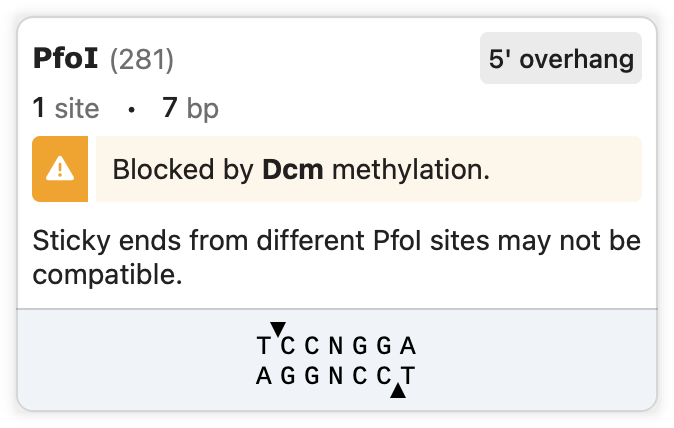

Trace view has been updated to be fully integrated into the main SnapGene UI with a new mode to view full height. The redesigned flyover control for the folder panel improves access to key controls. The modernized info panel displays metadata and embedded files clearly.

SnapGene 8.1 updates Enzymes view to provide a streamlined UI consistent with other table views, includes numerous improvements to navigating files and data management, extends multi-file operations to any open file as well as Project search results, and adds a number of new coloring options that provide for enhanced visualization of your data.
Streamlined Interfaces Easily identify key information with streamlined expandable rows in the refreshed Enzymes view which provides enhanced filtering options and more intuitive scrolling. Controls in the Secondary Structure view now float above the content and the structure list and statistics have been modernized.

Improved Search Results and Actions
Live search results update when files are added, renamed, modified or deleted, while improved selection behavior, filtering, and sorting options allow you to more easily identify and modify files.

A number of new coloring options allow you to visualize residues and their associated chemical and transmembrane properties, locate buttons in the side toolbar, and switch between light and dark modes.

Navigation and Data Management
Efficiently navigate, annotate and manage your plasmids via the streamlined files and folders panel, which now enables viewing and performing bulk annotation and file transformations on all open sequence files. Focus on Region to zoom into larger sequences.

SnapGene 8.0 brings a fresh look and feel to the main data viewers, with new capabilities for bulk annotation and data manipulation, and new ways to edit alignments to a reference sequence.
Bulk annotate your plasmids with features and primers
Quickly detect common features and add primers from a list onto multiple sequences selected in the Project folder panel, change sequence attributes like methylation and topology and easily perform alignments and gel simulations on selected sequences.

Modern, streamlined Map, Sequence, Features and Primers views
Refreshed Map, Sequence, Features and Primers views are restructured and simplified to highlight key data and capabilities, with flexible filtering and sorting added to Features and Primers tables.


Edit Alignments to a Reference DNA Sequence
You can now validate your sequences with confidence by editing the gap positions in your Sanger traces and virtual constructs when using Align to a Reference DNA Sequence.
Enhancements to File and Folder Interactions
Data management is streamlined with improved file selection in the folder panel and new visualization and manipulation of unsaved files.
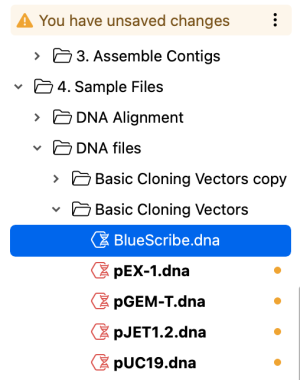
SnapGene 7.2 provides a new visualization of primer homodimer structures and enhancements to file management, allowing tabs to be organized in multiple windows using drag and drop, and improvements to interacting with files in projects.
Calculate Primer Homodimer Structures
Check your primers for self-dimerization by viewing homodimer structures with deltaG values, via the Show Structure buttons in Primers view.

Draggable File Tabs
Easily group your sequences by dragging file tabs in and out of the window to create multiple tabbed windows.

UX Enhancements for Interacting with Files
Smoother importing and interacting with tabs, files, and folders to address common issues, including enhancing the visibility of the current tab and file name, improved default view settings for chromatograms, drag and drop import into folders, and more.

New Common Features and Agarose Gel Ladders
Can now choose gel ladders from several additional suppliers, and more features have been added to the standard feature database for detection in your sequences.

This release includes a number of important fixes and improves overall stability
SnapGene 7.1 provides enhancements to streamline file search within a selected folder, introduces secondary structure visualizations for ssDNA sequences including primers, and includes a variety of fixes to improve stability, file import workflows and other functions.
File Search Enhancements
Quickly and easily build search queries to find your sequences and other files in the selected project folder with simplified filter entry controls, and run multiple searches in different tabs.


Secondary Structure View for Single-Stranded DNA Sequences
Visualize the secondary structure for single-stranded DNA sequences calculated with the ViennaRNA package via the new secondary structure tab

View Primer Hairpins and Secondary Structures
Check your primers for hairpins or other self-binding secondary structures with a new button for calculating secondary structures for primer monomers, available in the primers tab.

This release includes a number of stability and performance improvements as well as other fixes.
This release includes a number of important fixes and improves overall stability.
This release includes a number of important fixes and improves overall stability.
SnapGene 7.0 introduces an updated look and feel with enhanced data management capabilities. Easily navigate files and folders with tabs, and perform sequence and metadata-based searches for files directly from the new folder panel. Other enhancements include new primer insertion annotations and various usability improvements.
Tabbed Interface
Navigate between documents using the new tabbed interface, or pop out documents into separate windows for comparison purposes.

File and Folder Management
Choose any folder on your file system as a project and quickly view subfolders and files directly within a new, collapsible, folder panel. Perform standard file operations and quickly browse all supported file types.

File Search
Quickly find files within a project using attributes such as the name or type, containing sequence, feature annotations and more via a flexible, modern interface.


Primer Annotations
Visualize insertions such as enzymes, codon or short peptide sequences added to your primers in the updated Add/Edit Primer dialog. Regions of interest (Golden Gate restriction sites, Gateway cloning attB sites, directional TOPO motif) are now annotated for primers designed automatically as well.

Preview Detected Features for New Sequences
The new file pane now includes a sequence map to preview features that are detected in your sequence and allows you to choose which annotations to include in your sequence.

Get Started
Quickly access recent files and folders using the new Get Started pane, or learn more about how to use SnapGene with links to short video tutorials, user guide articles, and the SnapGene Academy.

Search for and Import Sequences from Dotmatics Bioregister
Quickly and easily search for sequences in Dotmatics Bioregister directly from within SnapGene based on the sequence name, Bioregister ID, or a similar sequence (BLAST search). Save a sequence of interest locally or open it in SnapGene right away. This integration requires Bioregister 6.1.0 or later.


Version 6.2.1. enables registering sequences in Dotmatics Bioregister in addition to a fixing various other issues.
Register in Dotmatics Bioregister
Quickly and easily register your sequences in Dotmatics Bioregister directly from within SnapGene. It is no longer necessary to first save using a specific file format and manually upload to Bioregister using a web browser. This integration requires Bioregister 22.2 or later.
